
The question is no longer whether a business needs software. It is which kind of software should handle each part of the work.
Traditional software is excellent at following known rules, processing transactions and keeping records consistent. AI agents suit work where the goal is clear but the exact steps depend on context. For most organisations the answer is not one or the other, but a deliberate split between the two.
AI Agents vs Traditional Software: The Difference in One Minute
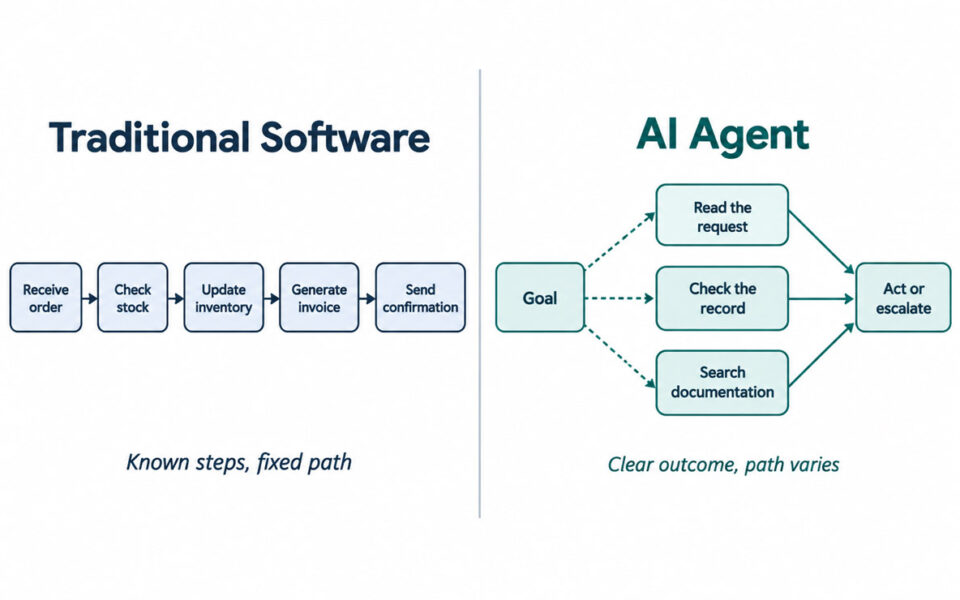
Traditional software executes known instructions reliably. AI agents work towards a goal when the exact path can change.
Traditional software
A traditional application follows rules programmed into it. An order system takes an order, checks stock, updates inventory, generates an invoice and sends a confirmation. The workflow is predictable because the business has already defined every step.
AI agents
An agent interprets information, decides what to do next, uses connected tools and completes several steps towards an objective. It might read a customer message, review the account, search internal documentation, then reply, update a record or escalate.
The rule of thumb: known steps favour traditional software; changing steps and ambiguous inputs strengthen the case for an agent.
What Traditional Software Does Better
Deterministic software is often treated as outdated now that systems can reason over natural language. That misses the point: many business processes do not need reasoning at all, and adding it introduces variation where none is wanted.
- Financial transactions and accounting records
- Payroll calculations
- Inventory updates and order processing
- Booking and scheduling rules
- Compliance workflows with clearly defined conditions
- Core ERP and CRM data management
These systems give predictable outputs and straightforward auditing. If the same input should always produce the same result, an agent adds cost and uncertainty without adding value.
What AI Agents Do Better
Agents earn their place when the work depends on information that resists fixed rules.
Unstructured information. Emails, documents, notes and free-form requests arrive daily; an agent can read them and turn them into structured actions.
Variable workflows. Cases that look alike often need different handling. An agent weighs the context and chooses a next step rather than following one predetermined path.
Work spread across systems. Rather than an employee copying data between applications, an agent gathers what it needs through APIs and triggers approved actions across tools.
Goal-oriented work. The deepest difference: traditional software is told how to complete a task; an agent is given an outcome and works out how to reach it within defined permissions.
Side-by-Side Comparison
| Factor | Traditional Software | AI Agent |
|---|---|---|
| Decision-making | Predefined rules | Context-aware decisions |
| Workflow | Fixed or highly structured | Dynamic and goal-oriented |
| Data | Best with structured data | Structured and unstructured |
| Adaptability | Changes require rule updates | Handles greater variation |
| Predictability | Very high | Requires testing and guardrails |
| Tool use | Defined integrations | Coordinates multiple tools |
| Auditability | Generally straightforward | Needs stronger monitoring |
| Best fit | Stable, repeatable processes | Variable, knowledge-intensive work |
Same Workflow, Different Technology
Customer support
Traditional software: a ticket arrives, a category is applied, the issue is routed to a queue and a template response may go out.
AI agent: the request is read, the intent identified, order detail retrieved, approved sources checked, a reply drafted and the record updated — with escalation when the case falls outside the agent’s remit.
Finance
Traditional software: a known transaction is posted according to established accounting rules.
AI agent: an unusual invoice is read, matched against purchase records and passed to a person with a recommendation.
Sales
Traditional software: a follow-up task fires when a lead hits a given stage or date.
AI agent: recent interactions are reviewed, prospects needing attention identified, and a follow-up drafted.
Choosing Between Them
Traditional software wins where rules are clear and uncertainty is low: stable processes, consistent inputs, reproducible decisions, high cost of error. There is little reason to deploy an agent to run a payroll calculation existing software already handles reliably.
An agent makes more sense when staff spend real time interpreting information, making repeated judgement calls or moving between systems — when inputs are unstructured, exceptions are common and the outcome is clear even though the route to it varies.
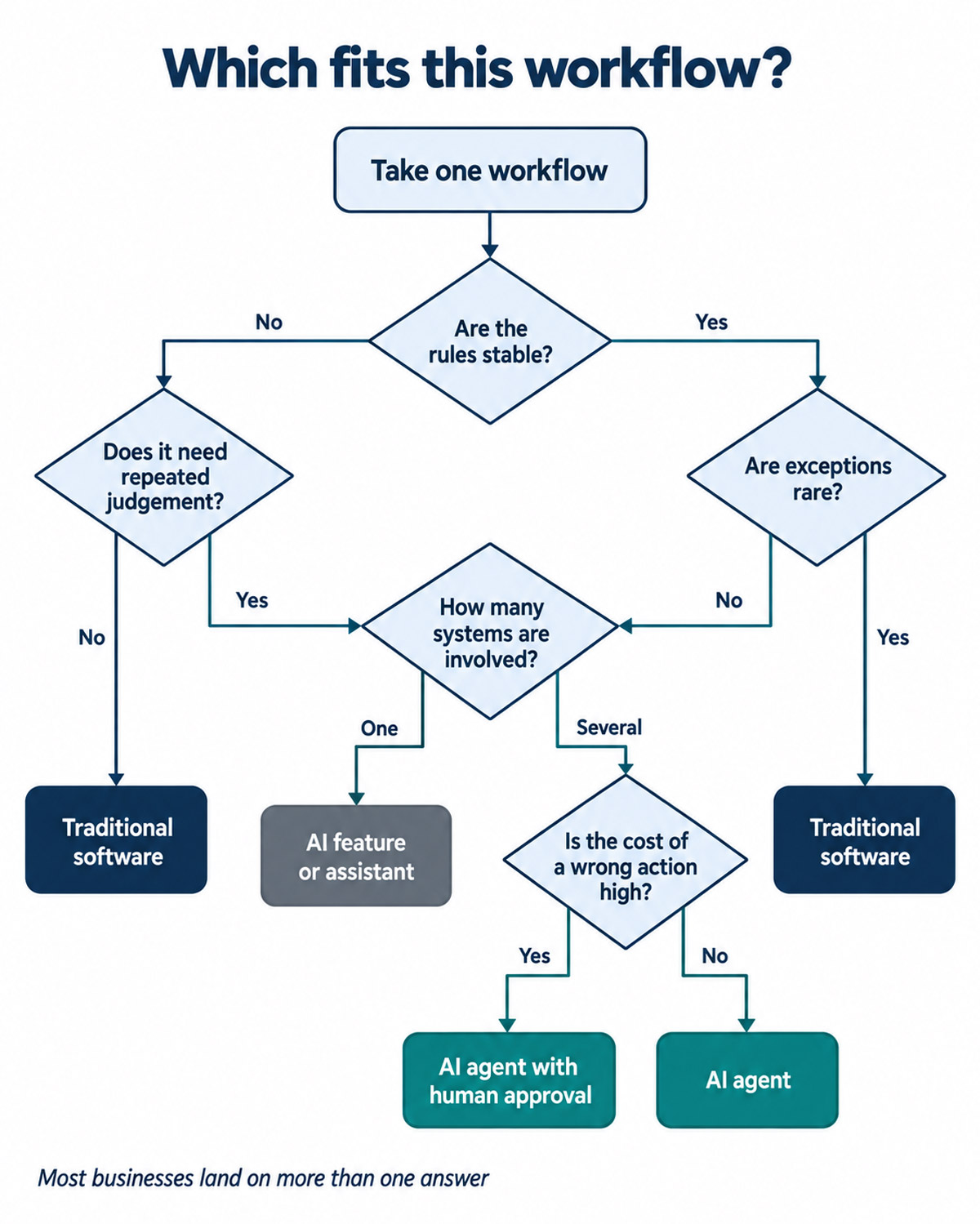
Six questions to ask about the workflow
- Are the rules stable? Stable rules favour traditional software.
- Does the task require judgement? Repeated contextual decisions favour an agent.
- How often do exceptions occur? Frequent exceptions make rigid automation expensive to maintain.
- How many systems are involved? Coordination across tools is where agents pay off.
- What happens if it gets it wrong? High-consequence work needs stronger controls and human approval.
- How much autonomy is actually needed? A system that recommends is very different from one that executes.
When the Best Answer Is a Hybrid
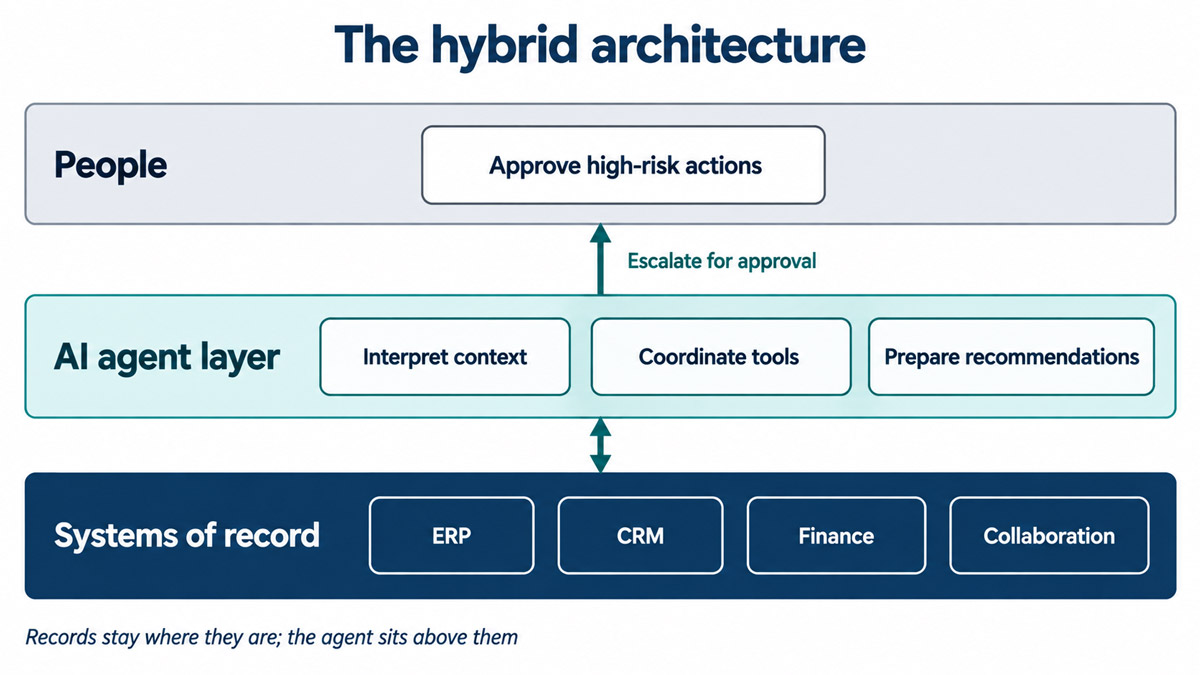
For many businesses the strongest architecture combines both. Traditional software holds the records and executes controlled transactions. Agents interpret context and coordinate work. People approve anything carrying significant risk.
An agent might review supplier documents, spot a discrepancy, pull supporting detail from the ERP and prepare a recommendation — while the transaction still runs through the finance system and a person signs it off.
It also removes the pressure to rip out established systems: an agent can sit above existing ERP, CRM and finance tools rather than replacing them.
AI Feature vs AI Assistant vs AI Agent
Not every product marketed as AI is an agent. An AI feature summarises or classifies information inside an existing application. An AI assistant answers questions, drafts content or suggests what to do next. An AI agent goes further: it interprets a goal, uses tools, decides within defined boundaries and takes action.
The useful question is not what a vendor calls the product, but what it can complete without a person driving every step.
Costs, Risks and Trade-Offs
The weakness of traditional software is rigidity. Every workflow change or new exception means rules redesigned, tested and maintained, and that ongoing cost is easy to underestimate.
Agents carry a different burden: they can reach incorrect conclusions and need continuing evaluation. Budgets should cover model usage, monitoring, testing and the human review time that responsible autonomy requires.
Regulation matters here too. Where an agent decides something about a person with legal or similarly significant effects — a credit outcome, a job application, an account closure — data protection rules on automated decision-making apply, and the UK and EU positions no longer sit in the same place. If you operate in both, build to the stricter standard.
For any high-impact workflow, define permissions, approval points, logging and escalation paths before extending autonomy.
Common Mistakes
- Using an agent for a simple rule-based task. More technology does not create more value.
- Assuming every complex workflow needs AI. Some complexity is best handled with good business logic.
- Granting broad tool access. Permissions should match what the role genuinely requires.
- Automating consequential decisions too early. Start with human review; widen autonomy on measured performance.
- Replacing core systems unnecessarily. Existing software can remain the system of record.
- Ignoring data quality. Poor information undermines both approaches equally.
How to Start Without Replacing Your Existing Software
Start with the workflow, not the technology.
- Map the process and find the bottlenecks.
- Separate predictable steps from judgement-heavy ones.
- Pick one high-value workflow with manageable risk.
- Deploy the agent with human approval, not full autonomy.
- Measure time, accuracy, manual effort and exception rates against the old baseline.
- Extend autonomy only where the numbers justify it.
Frequently Asked Questions
Can AI agents replace traditional software?
Rarely in full. Databases, transactions, business rules, authentication and operational records still need conventional software. Agents usually complement those systems rather than remove them.
Are AI agents more expensive than traditional software?
They can be. Alongside development, costs include model usage, monitoring, governance and human review. For simple, stable processes a conventional build is usually cheaper to run.
Can AI agents work with ERP and CRM systems?
Yes. They work through APIs and approved integrations to retrieve information, update records and start workflows within set permissions.
Conclusion: Choose the Technology That Fits the Work
This is rarely a replacement decision; it is a matching exercise. Use traditional software where certainty, repeatability and controlled transactions matter most. Use agents where the work depends on context, unstructured information and judgement. Use both where a process contains each.
The next step is to take one workflow and split it into predictable steps and ambiguous ones. That exercise usually shows where conventional software should stay in control, where an agent adds value, and where a person still needs to approve the outcome.
